Code Search gives coding agents type-aware search across every repository.
Contents
For most developers, the default has been one agent, one repository at a time. That stops working when the question is about the whole estate, like which services still call an API you’re deprecating, or how many repositories are on a framework version you need to upgrade. And when you need to change that code, you start with the same search, because you can’t change what you can’t find.
Sure, you can point an agent at a directory with hundreds of repositories cloned into it and let it grep. Or you could let it use the code search built into your source control platform. In either case, it’s still just matching text. Since text matches can’t tell you which library a call resolves to, every result has to be opened and checked by hand. Text also misses things that don’t look exactly like what you search for, such as aliased imports, wildcard imports, or calls through a subclass.
An agent can sift matches as well as a person can, but across thousands of repositories, that means reading thousands of files. It can’t even tell you how many matches there are without paging through all of them.
Moderne Code Search gives you and your agent type-aware search across every repository in your organization. Every result already knows the type and library it resolves to, so search results are actually accurate. When a search finds code that needs to change, it can be saved as the list of repositories to work on.
Code Search knows what the code resolves to.
Code Search runs on Trigrep, and its index is built from Moderne’s Lossless Semantic Trees (LSTs) instead of just the text. As a result, every call and reference in the Code Search index carries the type it resolves to and the version of the library that type came from.
That means an agent doesn’t have to open a result to know what it is. In Java, for example, a search for calls to Spring’s StringUtils.isEmpty returns only those calls and none of the calls to Apache Commons Lang’s method of the same name. And because the index records each type’s complete inheritance chain, a search for calls to Collection.add finds myList.add(x) even though that line never mentions Collection.
Since every reference knows which library and version it came from, Code Search can do something the agent couldn’t do alone, and no text search can either. With the dependency: filter, a search can find every use of a library, or a version range of it, down to the individual symbol. A search for dependency:org.springframework:*:5.x returns every call and reference that resolves into Spring Framework 5 across every repository. Each match even shows exactly which artifact it came from, like spring-core:5.3.19, which isn’t necessarily the version that the build file declares. Change 5.x to 4.x or 1.x and you get the same answer for older versions.
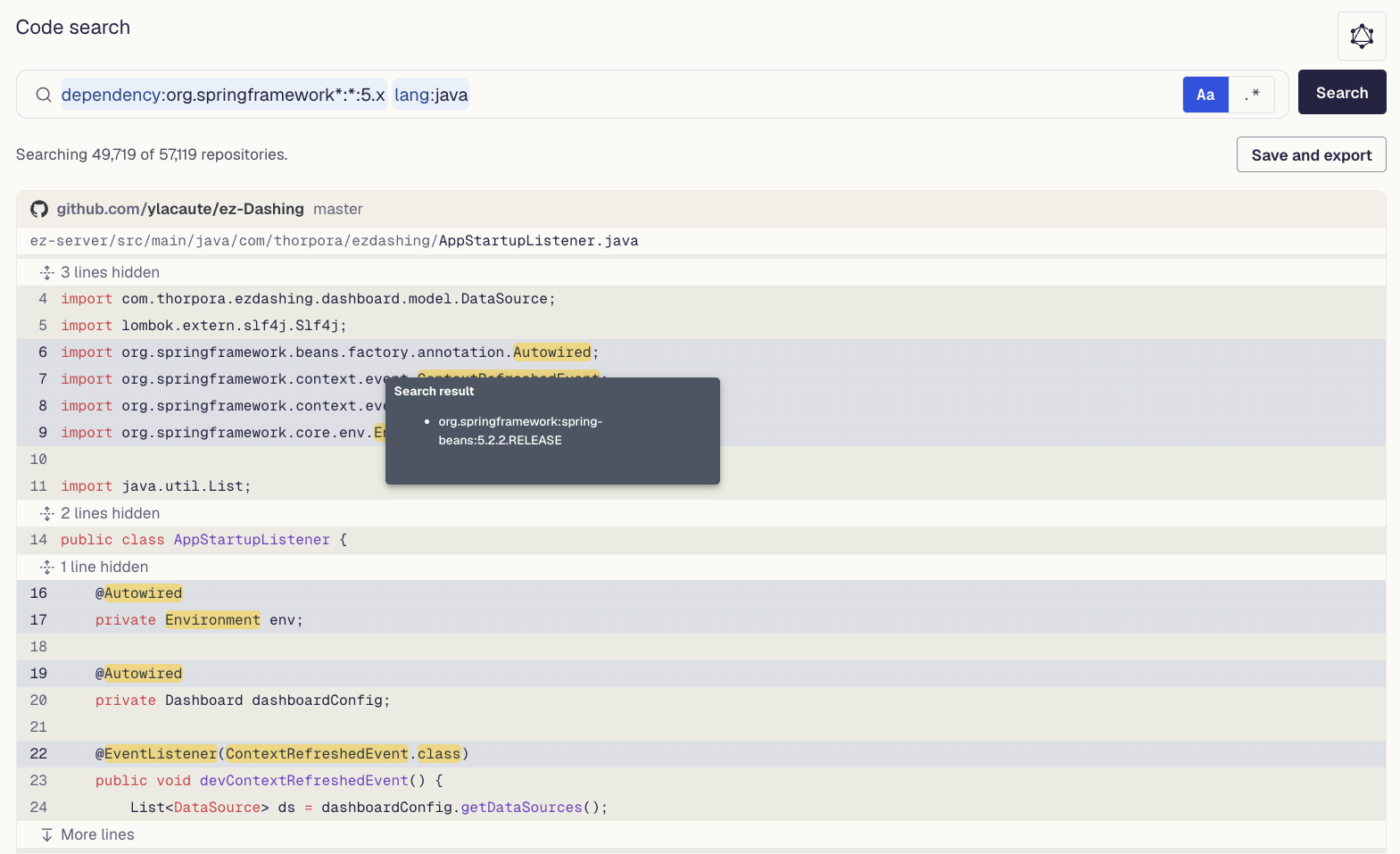
dependency: search for Spring Framework 5. Each highlighted match shows the exact artifact it resolves to.Agents can size the problem without reading the code.
Code Search can also return search results as a table, with one row per matching file or matching line. Agents can even use SQL to filter, join, and aggregate results right on the Moderne Platform, so they get back only the answer they’re looking for. Instead of spending tokens paging through matches to count them, the agent asks for the count. How many repositories in each organization still use Spring 5? Which repositories call a deprecated API most often?
We didn’t set out to build a SQL interface for code search. Agents were already using SQL to query the data tables Moderne recipes produce, and it became clear they wanted to be able to do something similar with search results instead of paging through them. Once they could run queries like this, they started asking bigger questions, like what share of each business unit’s repositories still use Spring 5, and which of those use it in only a couple of files as opposed to all through the code.
Agents can run these queries as a tool or from the CLI with mod search --syntax=sql. Every match also carries its file, line, and column, so once an agent knows the scope, it opens only the lines that matter.
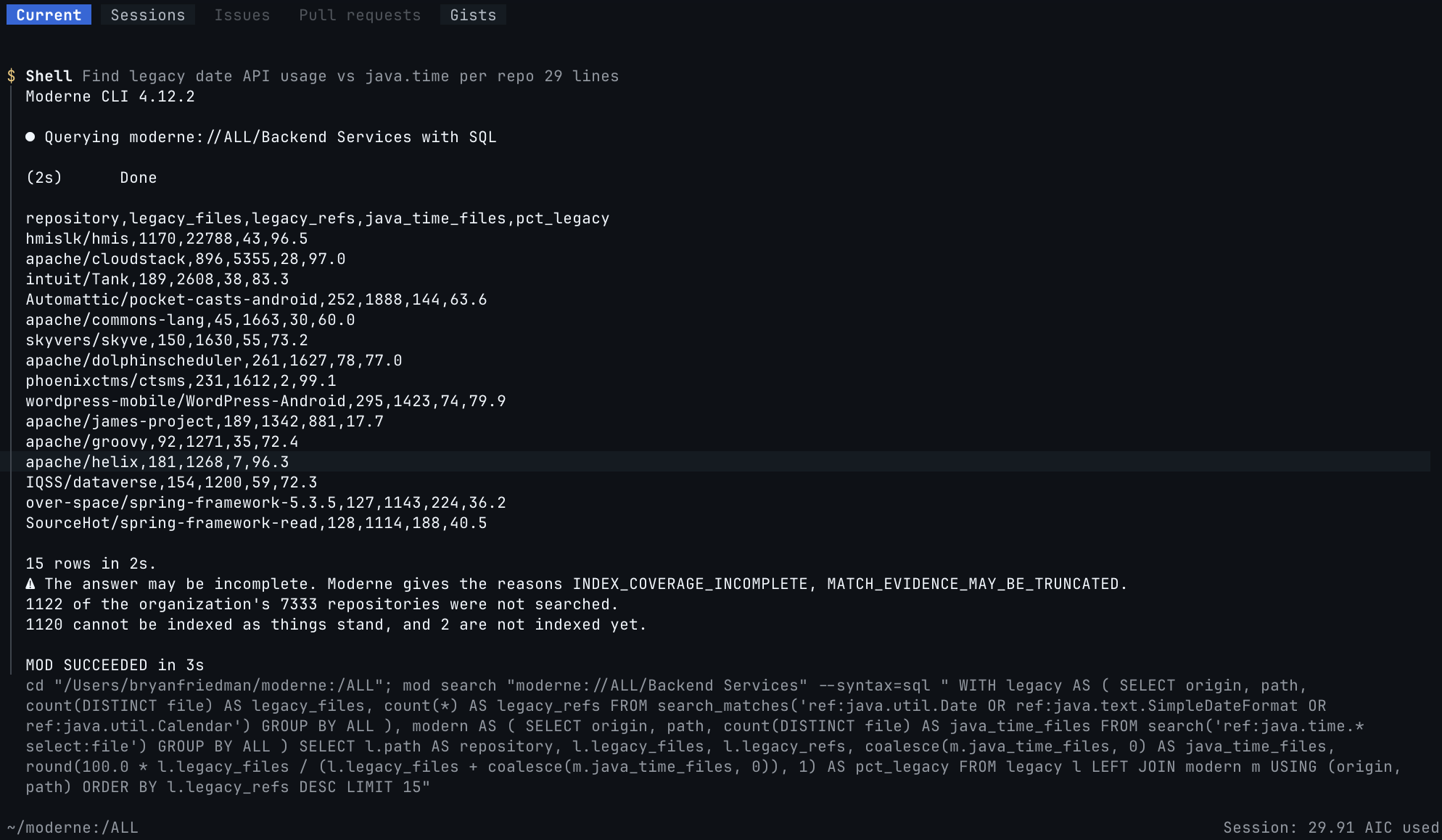
java.time per repository in one SQL query, without opening a file.Filters make the results precise at enterprise scale.
Code Search’s filters are how you use everything the LST knows about the code in a query. Filters like call:, ref:, extends:, annotated:, dependency: and others return exactly the right parts of the code, so an agent can zero in on what it was actually looking for.
Other filters help scope out the work. Use repo: to narrow a search to one team or business unit, and select:file to group results by file and show how spread out the matching usage is. That’s how an agent can size the blast radius of a change before touching anything, because a library that shows up in two test files is a smaller job than a library used in almost every module.
There are even filters for mainframe code, like ref.copy: for copybooks, ref.pgm: for programs, and call: for a program’s callers. With them, an agent can follow how programs, copybooks, and data connect, one step at a time.
A saved search is where the work starts.
Even a large code transformation starts with search, to find where the problem lives and how big it is. It may take a few tries to get a query that returns exactly what you or your agent are looking for. But once it’s right, you want to make the changes in only the places you found.
Code Search lets you save a search so it becomes the starting point for making changes. Use --save (and an optional --name) with the mod search command, save from the Code Search page in the Platform, or let your agent do it. A saved search shows up in the organization’s Activity view, and becomes a changeset.
A changeset is how the Moderne Platform tracks a unit of work across many repositories. It maintains a branch for each repository in the set that holds the changes made so far. It’s the result of both recipe runs and saved searches, scoped to the repositories that matched.
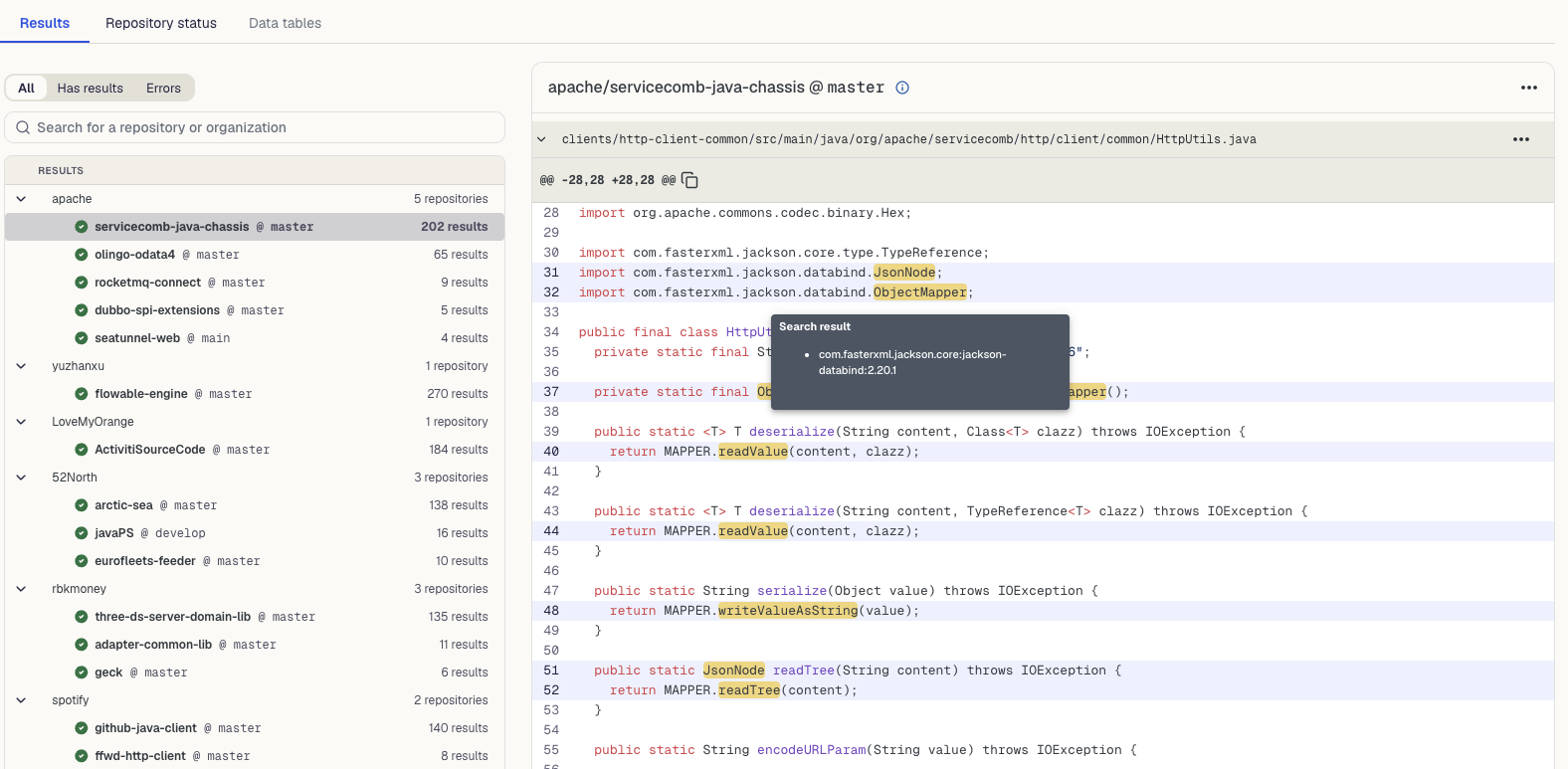
Agents pull down only the repositories that matched, make the change, and then push it back to the changeset. When the work is ready, each repository’s branch can become a PR or be committed directly to source control.
An agent can trace a phone number through COBOL code.
Agents can also chain searches together, so each result leads to the next search. The clearest example we’ve seen came from an architect at a bank.
She needed to change every phone number field in their COBOL code from 13 characters to 20 so their systems could accept international numbers. She was tracing each field by hand. She began by searching for whatever a phone number might be called. For each match, she’d find the variable it got moved into, record it in a spreadsheet, and search for that variable next. At the end, she’d have a list of everything that needed to change.
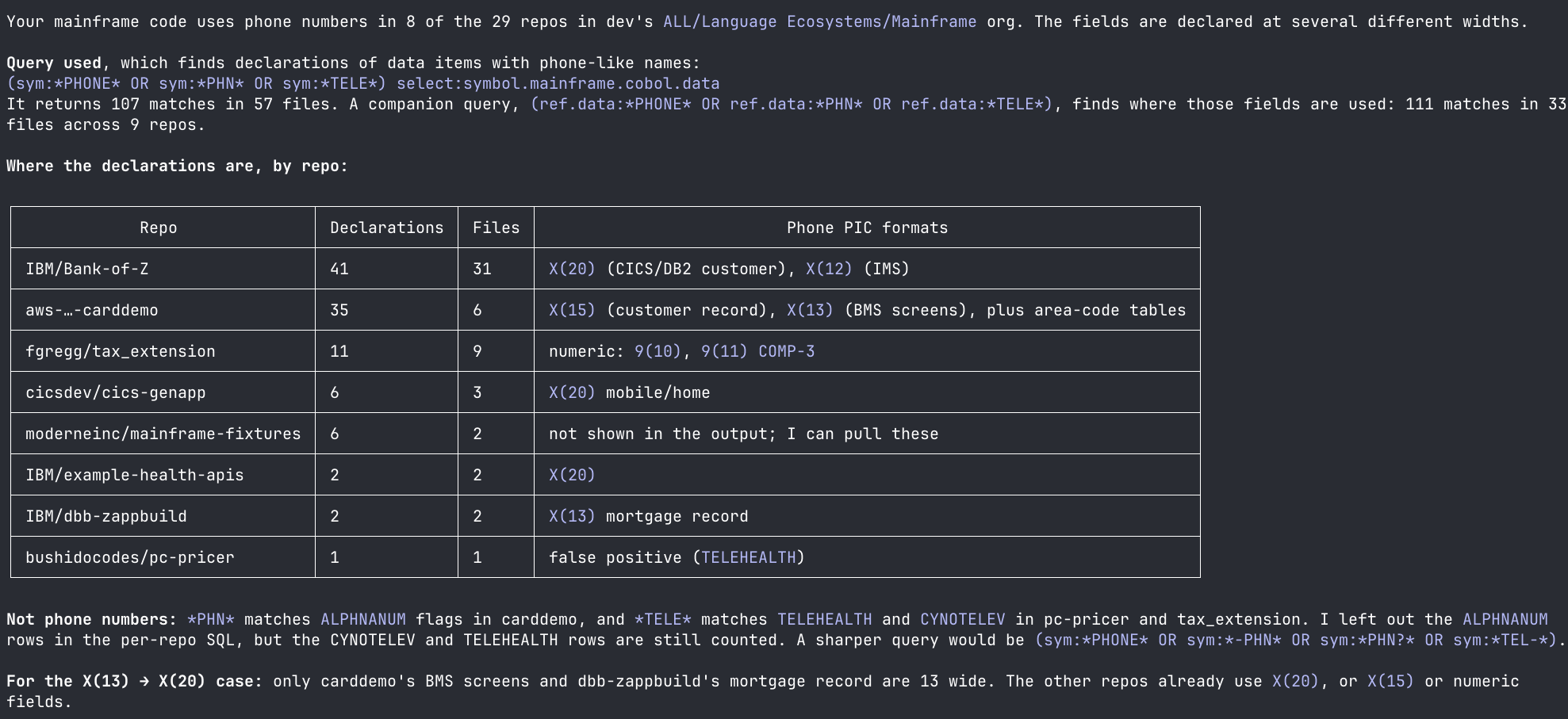
An agent can run the same loop with Code Search. For instance, we asked one to figure out how phone numbers are used in a sample mainframe codebase. It searched for “phone” fields, then for the variables each was moved into. It repeated that with every new variable it found, reading only the lines it needed. A few minutes later, it had found the PIC fields that needed widening.
Saved as a changeset, that replaces the write-up done by hand, so a developer or agent knows the exact places to change.
Try Code Search on your own code.
Code Search is available to all Moderne customers now as a preview, or you can try it on open source code. Open the Code Search page in the Platform, or have your agent do the search for you. Download the CLI and use it to launch your agent. Then ask your agent a question about your whole codebase and see what comes back.